WordPress site speed with load time under 1 second
Faster WordPress means visitors and search engines both experience a responsive site—from the feel of sub-1s load to impact on sales, SEO, and how you order a load-time engagement with Hamranik.

Quick outline
Many shops and companies raise ad spend when sales or leads stall. The problem: if the page opens late, those expensive clicks leak away. Speeding up a WordPress site by cutting load time toward under 1 second is about that foundation—an experience that makes ads and content pay off.
At Hamranik we speak the language of business decisions—not a technical handout. Ready for a review? Send the form on Contact us.
What does WordPress site speed mean—and why does it matter for business?
WordPress site speed means your page opens so visitors do not wait, content appears early, and core actions—add to cart, submit a form, call—work without friction. It is not only a tool score; it shapes how professional the brand feels, how long people stay, and how ready search engines are to crawl and show the page.
For a business, a slow site is a half-open storefront: the offer exists, but the entrance feels weak. In a shop, every second of delay can erase part of a purchase; on a corporate site the same delay erodes trust and stretches the path to a consultation request.
At Hamranik we do not treat speed as separate from design or content. A site works when it is fast, clear, and indexable. Technical SEO & content growth focuses on that mix: a solid technical base, then targeted traffic growth.
If you already run WordPress or WooCommerce and feel “everything is ready but results are thin,” the first bottleneck may be load time—not a lack of ads. This page is written for management decisions, not an internal engineering manual.
Shorter page load time: a plain definition for site and store owners
Shorter page load means cutting the gap between the click and the moment main content is visible and usable. Owners do not need lab jargon day to day; they need to know what users see in the first seconds and whether they can start their task.
Load time shows up in simple signals: a long white screen, a large image that arrives late, buttons that jump, or a form that ignores taps for several seconds. Those signals are clearer for business decisions than a dense metric table.
In a shop, slow load is costly on product and cart pages. On a corporate site, service pages and the contact form are the choke points. Speed and lead conversion travel together on those paths.
Important: load-time work is not “done once.” After a new theme, plugin, or campaign with heavy scripts, check again. Speed is a maintained asset, not a permanent badge.
What does under-1-second load mean—and how does it feel?
Under-1-second load means the page answers almost at once: content appears early, key elements do not jump, and the visitor feels the site is “ready.” That feeling links to brand quality before they even read the service copy.
On mobile, the gap between a slow site and a sub-1s site is tangible: one gets closed for a competitor; the other gets scrolled through to a form or cart. That short gap often outperforms any slogan.
“Under 1 second” is an experience target, not magic. Lab metrics can move a little by page, network, and device. What matters is that business-critical paths—home, service, product, cart, contact—feel fast and stable.
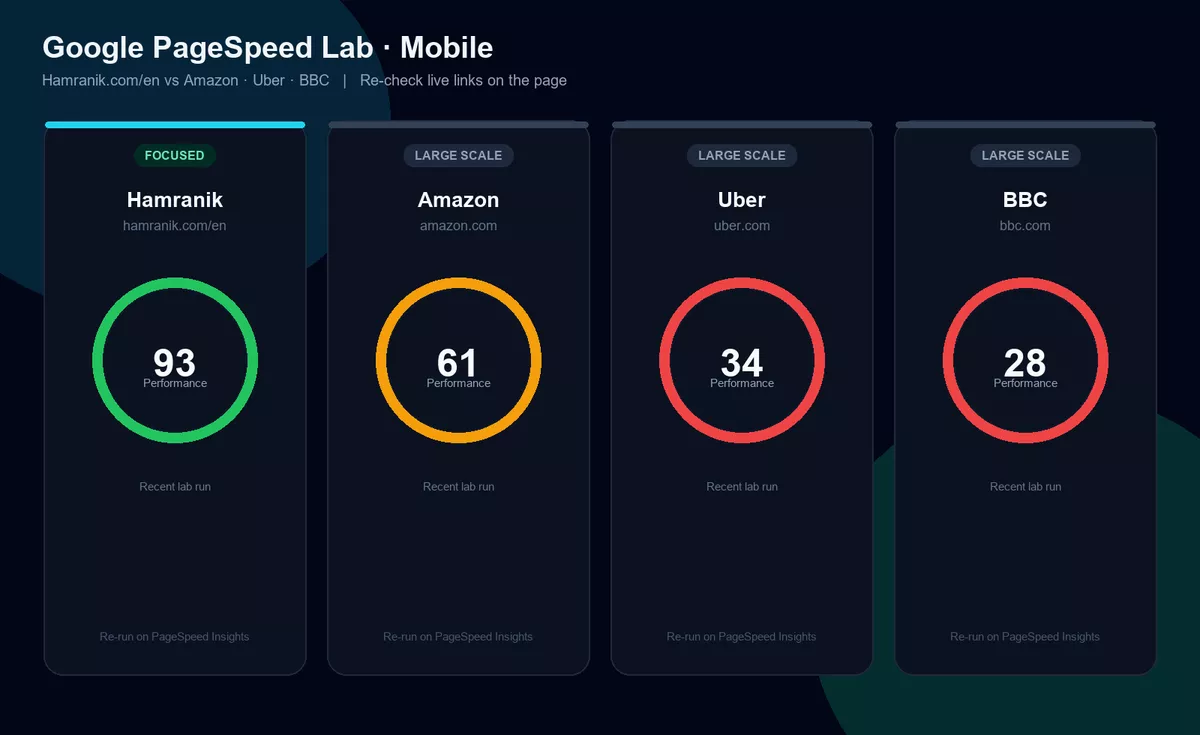
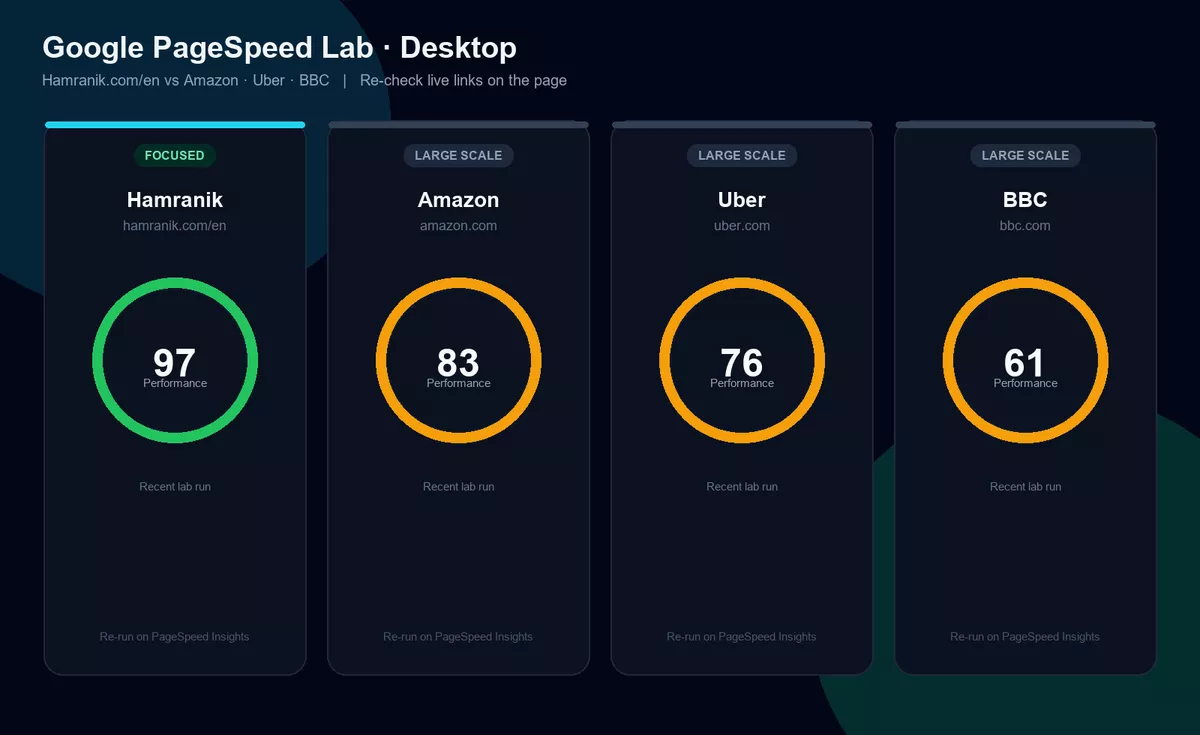
Below, official Google PageSpeed reports on Hamranik.com/en and well-known brands make the speed gap visible. Numbers are snapshots; refresh the links yourself to measure the same moment.
Proof with Google PageSpeed — live comparison
This is Google’s official tool. The comparison shows homepage speed gaps—not a claim that large brands run WordPress, and not a verdict on their whole business. Screenshots focus on the Performance score; captions note the run date. Lab scores vary; re-check the links yourself. Hamranik.com/en has recently measured near 100 Performance in lab runs (often ~98–100). Large brands like Amazon, Uber, and BBC optimize for scale and rich features; a focused site can still show disciplined lab Performance.
Why so many WordPress sites stay slow despite good hosting and themes
Because speed is not hosting alone or theme alone. WordPress is layered: content, media, plugins, page builders, marketing scripts, fonts, and update habits. When one layer gets heavy, even expensive hosting cannot work miracles.
Many teams pile on plugins for years without measuring each one’s effect on load—or buy a beautiful theme and crowd the homepage with widgets. Result: it looks fine on office desktop and exhausts customers on mobile.
Choosing a CMS alone does not deliver “SEO-ready” or “speed-ready.” WordPress is a tool; outcomes depend on architecture and maintenance.
So if you hear “our hosting is good, so the site should be fast,” that sentence is incomplete. Speed is the output of many decisions—and until the real bottleneck is found, blind host swaps only move cost around.
Real speed gains vs superficial, temporary work
Superficial work often improves a report for a few days without changing the real user path—temporary caching without discipline, randomly removing a needed feature, or a one-click plugin promise with no before/after on revenue pages.
Real speed work starts with priorities: which pages make money? Where do users enter first? What blocks them in the first seconds? Then results should show in behavior—lower bounce, smoother cart or form paths, stable mobile feel.
Another difference is durability. Real optimization comes with a maintenance plan; otherwise two new plugins or heavy image uploads undo the work. Speed is like warehouse hygiene: one clean-up is not enough if clutter keeps arriving.
At Hamranik we measure success by feel and numbers on your critical pages—not generic slogans. If you only want a pretty screenshot with no commercial effect, that is the wrong path; if you want under-1s feel on the conversion path, the conversation gets serious.
WooCommerce and online store speed
A WordPress shop is usually heavier than a brochure site: catalogs, filters, cart, checkout, accounts, and notices. Here slowness is not just annoying—it ties directly to abandoned carts and lost revenue.
Shoppers are impatient. If a product page is late or Add to cart activates late, even a strong discount arrives too late. WooCommerce speed means prioritizing the purchase path—not only polishing the About page.
Comparing with very large brands is useful in one sense: even high-traffic sites pay a complexity tax. As a focused store you can compete on a shorter, lighter path—if you treat load time seriously.
If you advertise but conversion is low, check landing and product speed before raising ad budgets. Optimization often costs less than leaking slow clicks.
To review your site speed and get an action path, send the order form on Contact us.
Corporate and brochure WordPress site speed
A corporate site usually does not sell an instant cart; it builds trust, shows expertise, and captures consultation requests. Speed still matters: decision-makers give slow sites little patience.
Service, portfolio, and contact pages must open fast and readable. A heavy mobile menu or a late contact form drops expensive leads. Speed rides on that page skeleton.
Many corporate sites look fine on office desktops and are barely usable on a phone in transit. Corporate site speed means real mobile experience—not only looking responsive.
If you are torn between a full redesign and speed work, first see whether the current base can reach an acceptable load level. Sometimes disciplined technical hygiene on the same site improves traffic and conversion—without a multi-month redesign.
How site speed affects SEO and visibility in Google
Search engines want to show pages that are both relevant and reasonably usable. Speed and display stability are part of that experience. If crawl is hard or the page becomes meaningful late, strong content is seen later too.
Google’s SEO Starter Guide also reminds that technical and content work together. Speed does not replace useful content—but without a fast base, content energy leaks away.
Corporate technical SEO—structure, indexation, titles, internal links—and speed sit in one basket. This page focuses on load time and the under-1s feel; the parent service covers the wider technical base.
So if you only publish articles and buy backlinks while the mobile site is heavy, expecting durable growth is unrealistic. Smooth the path for crawl and users first, then scale content.
Speed’s role in sales, conversion rate, and customer trust
Trust is built in the first seconds. A fast site sends an unspoken message: “this business is organized.” A slow site sends another—even if the service copy is excellent.
On conversion, speed usually works as a mix: longer time on page, completed forms, fewer abandoned carts, and return visits. We do not promise a magic percentage; measure the critical path before and after.
Much traffic arrives on mobile over variable networks. Optimizing only for office Wi‑Fi is not enough. If the customer does not leave on mobile data, you have already beaten a slower rival.
Sales and trust are not ads alone; your digital product—the site—is part of selling. Speed here is not overhead; it protects acquisition spend.
To review your site speed and get an action path, send the order form on Contact us.
Signs your site needs shorter load times
If users say “your site will not open” or support keeps hearing about slowness, that signal is enough. Do not wait for a complex score; repeated customer complaints are opportunity cost.
Other signs: high bounce on ad landings, many abandoned carts, unfinished contact forms, or a clear gap between office desktop and mobile sales experience.
If load felt worse after a new plugin, theme, or heavy analytics campaign, it is time to review. Changes stack until they cross user patience.
And if a peer competitor feels quicker—even with fewer features—speed may be the hidden advantage. One fair mobile comparison often clarifies priorities.
Themes, plugins, and page builders: where they drag speed down
A busy theme with heavy animation and many sliders is not always the only culprit—but it is often a main one. Beauty without a performance budget gets expensive on mobile.
Each plugin promises a feature; together they can break the speed promise. Page builders that stack blocks without discipline inflate HTML and scripts.
Listing which button to click does not help a management decision. What matters is knowing the bottleneck is usually accumulated choices, not a mysterious virus. Discipline in themes, plugins, and blocks is itself part of speeding up.
If marketing connects a new tool every week, a speed owner should be in that meeting. Otherwise ad spend rises while the site slows under the same tools.
Mobile, desktop, and real-world user speed
Testing only on an office laptop is half the truth. Many buyers decide on mobile, on variable networks, while commuting or at work. Optimize desktop alone and you miss half the market.
Google PageSpeed models mobile more strictly—why the mobile screenshots lead the proof block on this page. Strong desktop and weak mobile means work remains.
Real speed means readable text without pinch-zoom, tappable buttons, a submittable form, and a hero image that arrives early—not one that appears after scroll and pushes the layout.
When you order the service, agree on critical mobile pages: home, main product or service, cart or contact form. Those should feel near under-1s under real network pressure.
Before and after a speed engagement: what should change?
Before: a clear picture of the current state—mobile load feel, important pages, and optionally a fresh PageSpeed report. Without a baseline, “after” means little.
After: critical pages should feel quicker to open, elements should jump less, and conversion paths should feel smoother. If only one tool number moves while users still wait, the work is not finished.
Business changes may include fewer slowness complaints, better landing behavior, and stronger readiness for campaigns. Exact size depends on your industry and traffic; we do not promise a fixed percentage.
Before/after screenshots—like the proof block on this page—help internal teams share one picture. Marketing and technical leads finally see the same evidence.
After delivery, a short observation window confirms updates have not undone the result. Durable speed means that short review loop.
Which sites gain the most from under-1-second load?
Stores running ads: every click has a cost; a slow site wastes part of that spend.
B2B service brands that buy expensive leads: a slow form means lost sales meetings.
Sites that sell or support on mobile: if more than half of visits are mobile, mobile speed is non-negotiable.
Businesses whose competitors are close on content but feel quicker—here speed can be the deciding edge.
To review your site speed and get an action path, send the order form on Contact us.
Common mistakes when trying to make WordPress faster
Installing “optimizer” plugins one after another without measurement and without a clear owner. Plugin conflicts can create slowness themselves.
Hastily removing essential sales features just for a temporary score. Speed should serve the business—not the other way around.
Swapping hosts as the first and only move without seeing the page bottleneck. Sometimes hosting is at fault; sometimes it is not.
Ignoring mobile and trusting only desktop feel. Another mistake: ending the project with no maintenance plan—results return two months later.
Copying a generic internet checklist without knowing your money pages usually burns time. The right path starts from your business priorities.
What should you expect from Hamranik’s speed service?
Right expectation: review the current state, clarify limits, optimize the agreed path, and deliver a faster feel on critical pages—with room to re-check results.
Wrong expectation: miracles on every unimportant page, a permanent score without maintenance, or ignoring a very weak host ceiling. We say plainly what is possible where.
We do not publish internal methods like a recipe book; focus stays on outcomes for your business. If you want free DIY training, this service is not that path.
If you also need redesign or content SEO, work can be phased. Corporate & ecommerce website design and technical SEO sit beside this service; custom WordPress plugin development is another related WordPress path when needed.
Ordering path: from first review to a faster site
Step one: fill the order form on Contact us with your site URL, business type (shop or corporate), and important pages.
Step two: initial review and clear findings—what is possible, what prerequisites exist, and if hosting or another limit sets a ceiling, that is said up front.
Step three: execution on the agreed scope. Focus on pages and paths tied to sales or leads.
Step four: delivery and joint review—load feel and, if needed, a fresh PageSpeed report—then a short maintenance guide so later plugins do not bury the result.
Note access or timing limits in the form so the first review is sharper. Ordering is short; your decision starts with one form.
To review your site speed and get an action path, send the order form on Contact us.
Support after optimization and keeping the speed result
After delivery, the main risk is speed regressing: a new plugin, an ad script, a huge image, or a theme change. Support means keeping those points controllable.
Keeping results needs a simple team rule: before installing a new tool, measure speed impact. One internal speed owner beats ten forgotten checklists.
When useful, short periodic reviews can stay part of the engagement—especially for stores that run campaigns constantly.
The goal is under-1s feel on the critical path as a lasting asset—not a one-week memory. If after a few months the feel slips, tell us before conversion drops.
What if hosting or the server is limited?
Sometimes the speed ceiling is hosting or server resources. Page-level optimization still helps, but you may not reach the ideal target until infrastructure is upgraded.
Our clear line: if the first review shows current hosting is a serious blocker, we say so in business language—not with technical excuses. Then the choice is yours: upgrade hosting, or set a more realistic target on the same stack.
That separation matters so budget is not spent in the wrong place. Host swaps are not always required; when they are, hiding it helps no one.
If you suspect weak shared hosting, mention it on the form. The first review clarifies it and shapes the right proposal path.
Slow site vs under-1s load from the customer’s view
Slow site: the user doubts, taps once, waits, maybe returns to search results. Unspoken message: “maybe later”—and later usually never comes.
Fast site: the user sees content at once, scrolls, reads price or service, and moves toward action. Unspoken message: “these people are serious.”
Customers do not care how many plugins you have or where the server sits. Only the moment’s feel matters. Competition is often won or lost in that moment.
The PageSpeed comparison block above is for internal teams; for the end customer, the open-page feel is enough. When customers are satisfied, reports usually follow.
Why this service matters for serious stores and brands
Because ads, content, and sales without a fast foundation are like filling a leaking bucket. Serious brands do not waste acquisition spend.
Because competitors do not sit still. Even if you lead today, accumulated slowness pulls you back tomorrow.
And because digital trust is part of brand today. Under-1s load on mobile is an invisible signature of quality.
If your shop or service brand has a growth plan, treat speed as seriously as payment checkout. Both affect path completion.
To review your site speed and get an action path, send the order form on Contact us.
FAQ: WordPress speed and shorter load times
The short answers below are for quick decisions. If your site situation is unusual, say so on the contact form so the first review is more precise.
Common questions usually turn on three axes: is under-1s realistic, is one plugin enough, and where does ordering start. Fuller answers sit in the cards below.
If you are still unsure after reading, a short first review usually clears more fog than ten generic articles—because it speaks to your real URL.
Hand your WordPress site speed to Hamranik now
If you have read this far, you likely feel the slowness—or want the path safer before the next campaign. Next step is simple: send the current state for review.
On Contact us, fill the order form with your site URL and goal (shop, corporate, or both). Note access or timing limits there too.
You can also browse Hamranik portfolio and Technical SEO & content growth.
The goal is clear: speed up your WordPress site by cutting load time—until under-1s feel sits on money and trust paths. Send the form; we start with the first review.
Want shorter load times on your WordPress site?
Send your site URL and business goal for a first review—from WooCommerce stores to corporate sites.